JDOODLE IDE
JDOODLE IDE

Driving adoption through legacy coding editor redesign

Driving adoption through legacy coding editor redesign

Driving adoption through legacy coding editor redesign

SaaS/B2C

SaaS/B2C

Coding Agent

Coding Agent

Dev Tool

Dev Tool

Role

Product Designer (UX)

Role

Product Designer (UX)

Role

Product Designer (UX)

Duration

9 months (Q3 2023 - Q2 2024)

Duration

9 months (Q3 2023 - Q2 2024)

Duration

9 months (Q3 2023 - Q2 2024)

Team

1 UX Designer, 1 Product Manager, 7 Engineers, 1 Founder

Team

1 UX Designer, 1 Product Manager, 7 Engineers, 1 Founder

Team

1 Principal UX Designer, 1 Product Manager, 7 Engineers, 1 Founder

  • JDoodle IDE Interface Design 01
  • JDoodle IDE Interface Design 02
  • JDoodle IDE Interface Design 03
  • JDoodle IDE Interface Design 04
  • JDoodle IDE Interface Design 01
  • JDoodle IDE Interface Design 02
  • JDoodle IDE Interface Design 03
  • JDoodle IDE Interface Design 04
  • JDoodle IDE Interface Design 01
  • JDoodle IDE Interface Design 02
  • JDoodle IDE Interface Design 03
  • JDoodle IDE Interface Design 04

What We Did

What We Did

Redesigned the code editor with a fully customizable modular layout

Simplified project discovery and language/framework management

Introduced team collaboration and live coding.

Integrated AI coding assistance to automate manual coding tasks

The Impact

The Impact

Sessions jumped from 88K to 970K (11x growth)

User intent baseline: 46% Medium intent, 30% Low intent, 24% High intent users

90%+ scroll depth across pages (users actually engaging)

Performance score: 89/100 (up from 68/100)

Context

Imagine learning to code and hitting a wall even before writing a single line of code. Installing the right coding tools, updating libraries and dependencies, configuring databases. A frustrating experience stopping learners and students.

JDoodle solves that with its cloud based IDE (Integrated Development Environment) supporting 90+ languages, frameworks and databases. Full suite code compiler with zero setup. Sounds simple enough.

However,

  • Nobody knew what the platform had to offer. The platform though popular, with good traffic, had virtually zero conversion.

  • Users treated the platform like a light weight sandbox tool, not a real development environment.

I joined as UX designer in Q3 2023 when JDoodle and its scrappy team was pivoting toward agentic coding solutions.

JDoodle IDE Interface New
JDoodle IDE Interface Old
Before
After
Why It Matters
Building for an Unchartered Territory

I spent years in Edu-tech building digital experiences for kids, I was looking for new challenges and learnings in the AI space.

Truth be told, I had limited understanding of developer tools and even less about how AI could support and elevate human experience. But this was an opportunity I was determined to take full advantage of.

As the sole UX Designer, I had the opportunity to:

Lead redesign and ux improvement efforts for a platform struggling to prove its value.

Conduct competitor analysis and user interviews that informed key product related decisions.

Envision where AI fit into real workflows, and not just a force plug.

Built a scaling design system and branding for a growing product suite.

JDoodle IDE Desktop and Mobile
The Problem
A legacy platform struggling with growing features

While the platform had scope for many structural improvements, We decided to focus on the following:

User Problem: The Existing Code Editor Was A Monolith

User tickets informed us of the frustration when using the editor which only supported vertical stacking layout. Code on top, output below. Sounds fine, until your code base gets bulky.

Business Problem: Drive Adoption And Conversion Through Discoverability

Users could already create projects without sign up. While this was a great way to show value, users were still bouncing off without knowing what the platform has to offer. Users saw the platform only as a free coding sandbox to write and execute lightweight coding projects.

Business Problem: Adapting to the AI shift in the tech landscape

By 2023, ChatGPT was reshaping developer workflows. Debugging, Code generation, Optimization weren’t manual tasks anymore. JDoodle needed to integrate AI or become obsolete.

The Research
Understanding users and their coding needs

With limited time and resource for deep research, I worked with what was already available. To narrow down assumptions and gain understanding of the platform, I initiated discussions with the founder (who built the legacy code editor) and engineering team. Additionally, I took the initiative for insight gathering:

Competitor Landscape

Compiled a detailed benchmark report to assess opportunities and understand key gaps and differentiators. The report allowed us to gain a deeper understanding of developer tools available at that time.

10 +

10 +

Competitor
products analyzed
Strength
Strength
Customizable UI

Customizable UI

Coding challenges & Assessments

Coding challenges & Assessments

APIs

APIs

Live Coding

Live Coding

Orgs and Teams

Orgs and Teams

Weakness
Weakness
Not beginner friendly

Not beginner friendly

Require installations and updates

Require installations and updates

Limitation over free plans

Limitation over free plans

Limited languages and frameworks

Limited languages and frameworks

IDE competitors screenshots
Mining for insights - User Tickets and Interviews

Gathered insights on bugs, frustrations and negative comments from support tickets. Additionally, we also reached out to first time coders, students and teachers to gain an understanding of how they used the platform. Insights from this report was eye-opening as it revealed the true emotions our users were feeling when using our platform.

“There is no way to tell from the IDE what project/repo you have open. Can we add title/description?”

“There is no way to tell from the IDE what project/repo you have open. Can we add title/description?”

“Please keep input and output side by side and generated file in the below it because during solving programming contests its a waste of time”
“it appears Project manager only shows projects for the language it is currently enabled for. There doesn’t appear to be a project manager setting that shows all projects regardless of language”
The Solution
Help users start their coding projects soon-ish

We decided to remove initial login barrier (with few limitations) so users can experience platform's time-to-first-value. Our focus for redesign efforts started with the following simple question.

How might we get users to discover value and start their coding journey with least friction?”
Design Decision 01
Layout that works with the user. Not against.

We dismantled and built the code editor from scratch. While we explored different layout formats, for the MVP, we compartmentalized key features in a three column layout. Improvements to project setup and project manager allowed user to quickly create and manage projects.

Key Features
Key Features

Side-by-side code and output view with output supporting interactive mode for manual inputs.

Collapsible project tree and resizable container allowing workspace freedom

Smart templates and AI generated projects to reduce blank canvas fatigue.

Contextual tab management based on AI + system and user related functionalities.

Impact
Impact

Drop in user tickets: Users stopped complaining about workspace related frustrations as they were able to customize to their coding needs.

Increased session duration. Users were able to get past the initial barrier and jump directly to their coding projects.

Increased adoption for new languages and frameworks: Students and coding enthusiasts started experimenting with new coding languages and frameworks

Design Improvement 01

Design Improvement 01

Layout customization allowing greater workspace freedom based on user work habits

JDoodle IDE Layout Design
Design Improvement 02

Design Improvement 02

Progressive reveal of project configurations allowing ease of project creation and exploration.

JDoodle IDE Project Creation Flow
Design Improvement 03

Design Improvement 03

Decluttering the code editor meant relocating not-so relevant features away from the main interface and unto user, help center and IDE related settings menu

JDoodle IDE Navigation and Modals
Design Improvement 04

Design Improvement 04

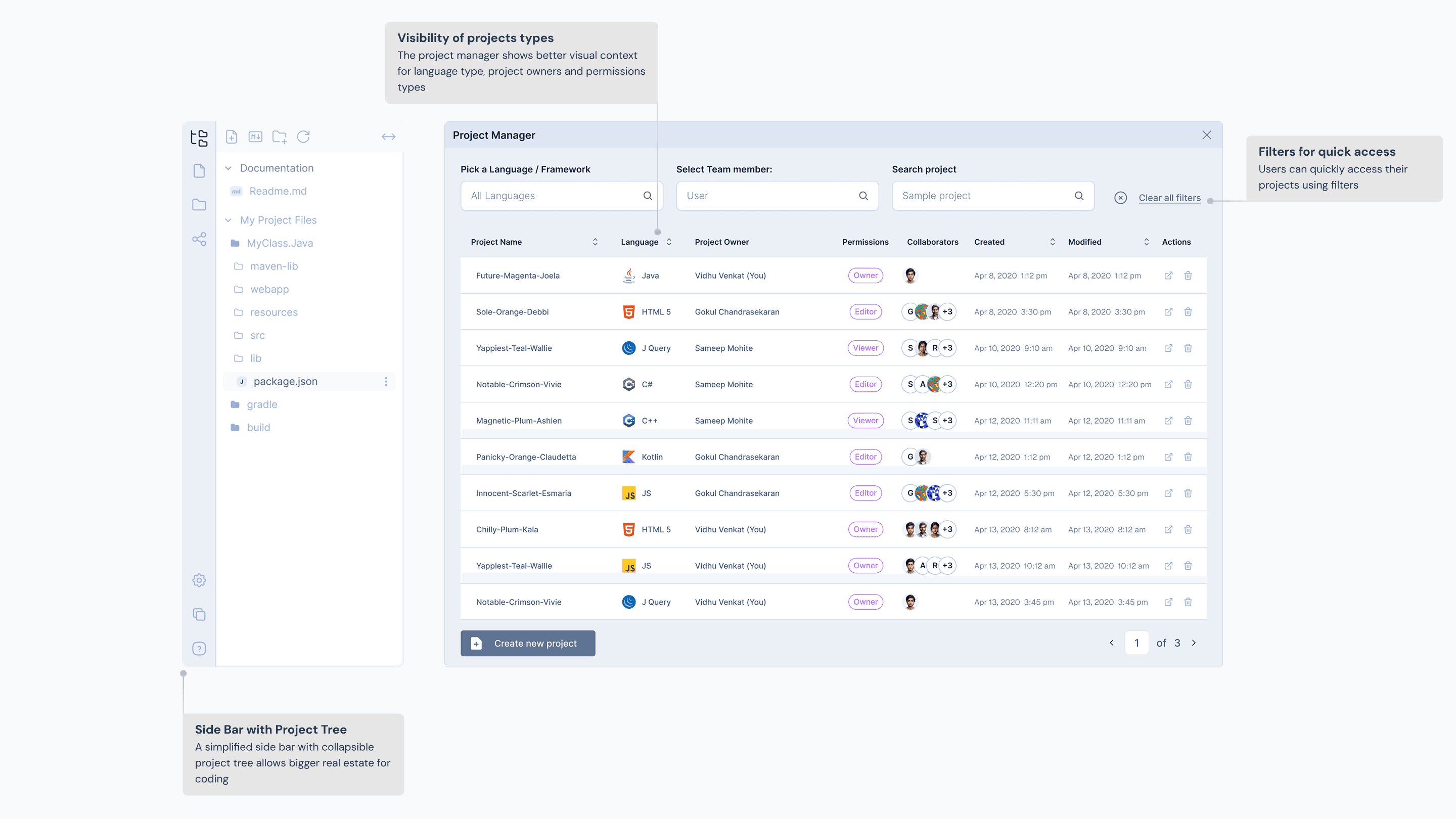
Improved project manager for viewing and managing personal and collaborative projects.

JDoodle IDE Side Bar and Project Manager
Design Decision 02
Collaboration as a way to engage and adopt

Personal coding projects while fun and self-exploratory, does not help users improve coding skills. Live coding was introduced to allow users with edit access to collaborate on a code base in real-time. A feature most requested by teachers and institutions alike.

Key Features
Key Features

Instant share for non logged users to quickly share a read-only version of their code project.

Fork and Assign allowing collaboration between teacher and student(s) on coding assignments.

Inviting users individually or by group meant for faster collaboration classroom environments.

Impact
Impact

Adoption for Team Plan: Teacher's most requested feature drove assignment sharing and team plan upgrades.

Non-logged users saw value beyond instant share which resulted in increased sign-ups and high intent sessions.

With group invites, the average session duration increased from 6.9 to 14.7 minutes, converting solo exploration into active collaborative

JDoodle IDE Share Project
Design Decision 03
JDroid, your friendly coding chatbot

Designing for JDroid as a coder friendly IDE chat agent was seminal in launching JDoodle’s vibe coding platform. With a focus on code automation, JDroid expedites key manual tasks in users coding journey.

Key Features
Key Features

A context aware agent giving tailored nudges and suggestions

Allows for users to generate project ideas and sample codes

Help with simple tasks like code optimize, debug to advance task like test case generation.

Response
Response

The initial reaction to JDroid was varied. While coding enthusiasts liked having a code companion that sped up their coding journey, Educators and instructors feared JDroid like coding agents adversely affected students learning.

JDoodle JDroid Chat
Other Decisions
Simplified user account management

The Challenge:

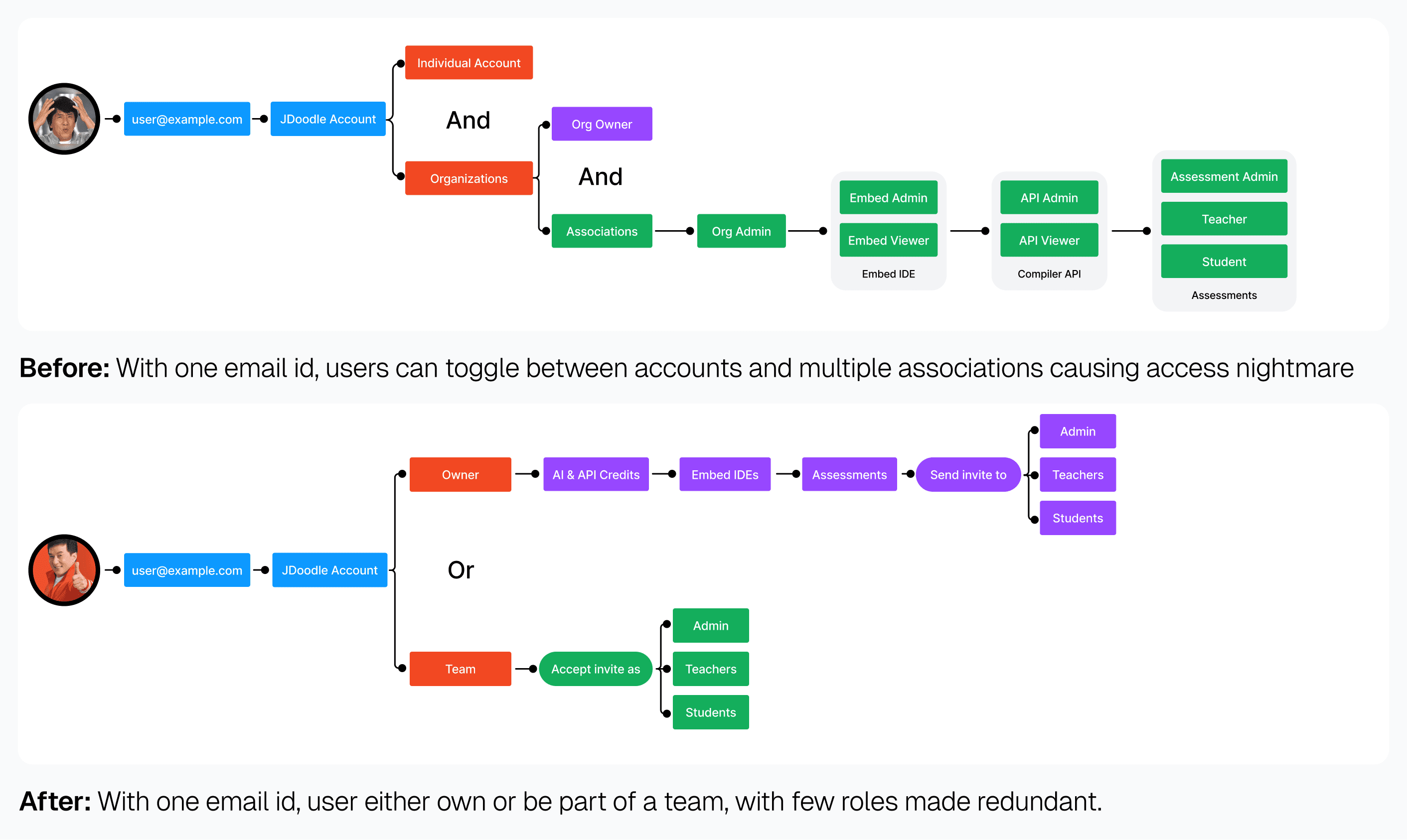
Users faced a nightmare with account management. The legacy system allowed multiple roles, across multiple team accounts tied to single email. This caused access conflicts, privilege confusion. Students had to delete existing accounts or create new ones to join an instructor’s team.

What we did:

We partnered with engineering on a backend architecture redesign. The new account logic was distilled down to

1 email = 1 account = 1 primary role.

Key Improvements:

Removed redundant roles and privileges based on the usage data.

Users can join/create teams using their existing accounts

Students can request access to instructor teams directly with no new sign ups required.

Project dashboard showing personal and team projects with role-based permissions.

JDoodle Account Management Logic
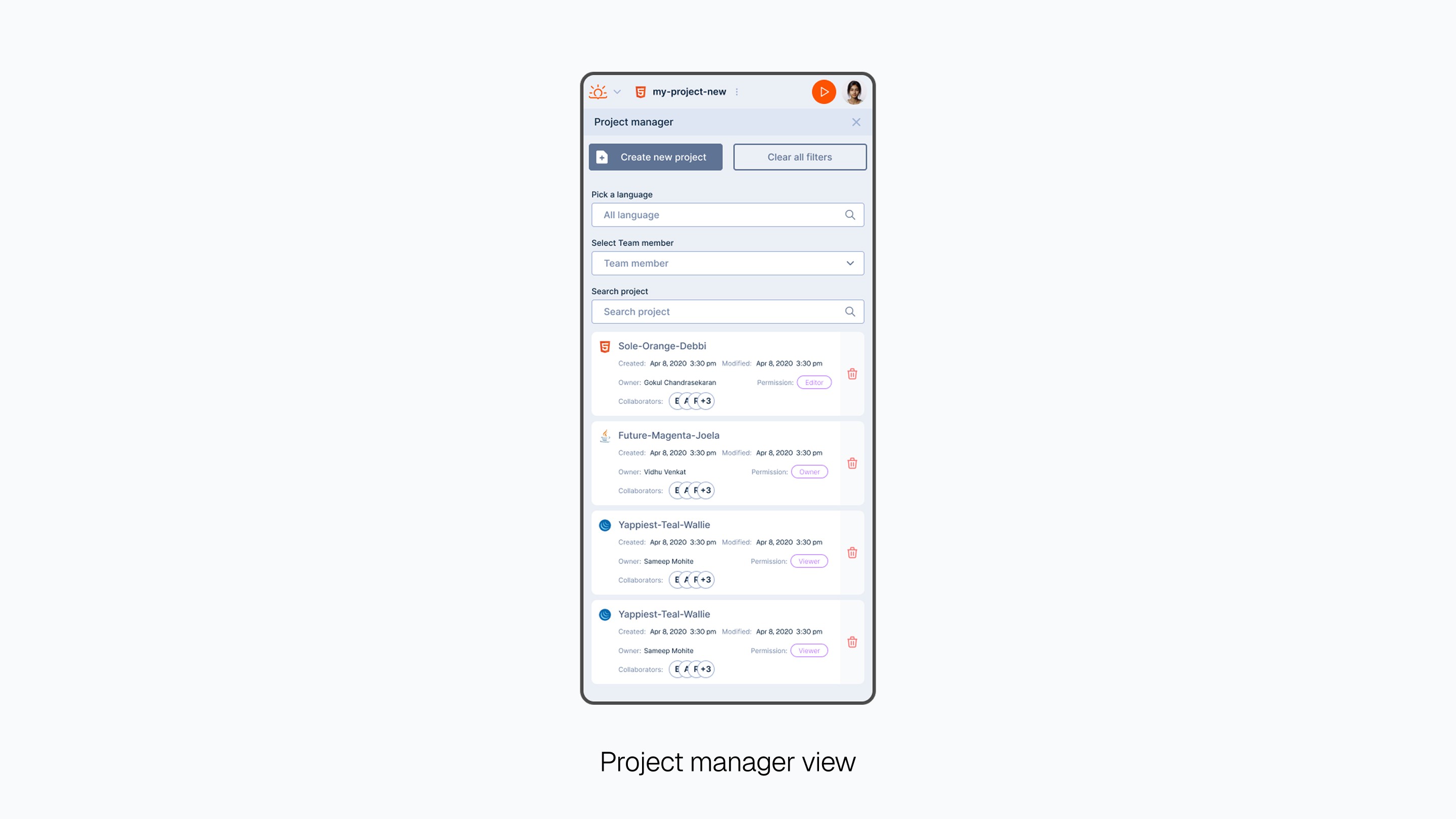
Mobile responsive before a native app

The Challenge:

Mobile users (15-20% of traffic per browser analytics) struggled with a desktop-first interface. The legacy web app broke on smaller screens and users abandoned sessions when they couldnt code effectively on phones.

What we did:

Prioritized responsive web design as a native app bridge. Restructured the layout with mobile-first breakpoints, fluid grids and touch-optimized controls before committing to a native app development.

Key Improvements:

Collapsible editor panels and menu bars that adapt to screen size and triggered contextually.

A universal touch friendly tab bar to access key features at the bottom of the screen.

Design system and brand redesign

The Challenge:

The UI audit before redesign revealed inconsistent and excess usage of brand orange color, fonts and components across editor, dashboard and marketing pages.

What we did:

Built a comprehensive design system from scratch. Created reusable tokens and components that scaled across web and mobile, establishing visual consistency across JDoodle product suites.

Key Improvements:

Color tokens: Built a complimentary color palette that reduced the excess orange usage. Introduced a new dark UI variant for the code editor since many developers preferred working in dark modes

Typography scales were streamlined and we finally pivoted from using Inter everywhere to Geist and Geist mono

Icon Library: Introduced custom icons specifically for code context.

UI Component library: Built reusable component kits like buttons, top bars, dropdowns with breakpoints and dark mode support.

Design System

Typography
Geist
Geist Mono
ABCDEFGHIJKLMNOPQRSTUVWXYZ
abcdefghijklmnopqrstuvwxyz
0123456789 !@#$%^&*()
Aa
Regular
Font Weight 400
Aa
Medium
Font Weight 500
Aa
Semibold
Font Weight 600
Aa
Bold
Font Weight 700

Typography: We introduced Geist as the default font across the marketing and web app for its close resemblance to Inter family. Geist Mono was reserved for code blocks.

Design System

Iconography

Icons: We explored many off-the-shelf icon libraries before settling for an in-house custom icon sets that catered to specific development use case.

Design System

Color Tokens

Colors: We reduced the brand orange influence by introducing a complimentary blue palette. Semantic tokens were derived from the primitives giving better control

Brand Kit

Logo mark and Logo type

Brand: The current logo combines the rising sun, a spark of an idea, brackets commonly seen in coding languages. The brand kit helped us define the color palette and proper usage across the product suites.

Retrospective
Iterative Design in startup chaos

While I was obsessing over perfect UX frameworks like double diamond process and affinity maps, we seldom had time, budget or the resource. Lean research made more practical sense. Insights from user tickets, competitor experiments and prototypes that never shipped taught more than any textbook process. Staying open to stakeholder feedback while keeping user pain points front and center made the difference. Design got better when I stopped chasing cool and focused on what worked for the user.

Becoming Developer without Coding

As a non-technical designer, working closely with the founder and engineers forced me to learn fast. I signed up for every competitor IDE, built tiny projects, cloned git repos, even played with vide coding apps all in an effort to understand developer behavior and frame the right problems and design solutions that felt native, not just pretty.

2026 Vidhu Venkat

Bangalore, India

2026 Vidhu Venkat

Bangalore, India

2026 Vidhu Venkat

Bangalore, India

Create a free website with Framer, the website builder loved by startups, designers and agencies.